
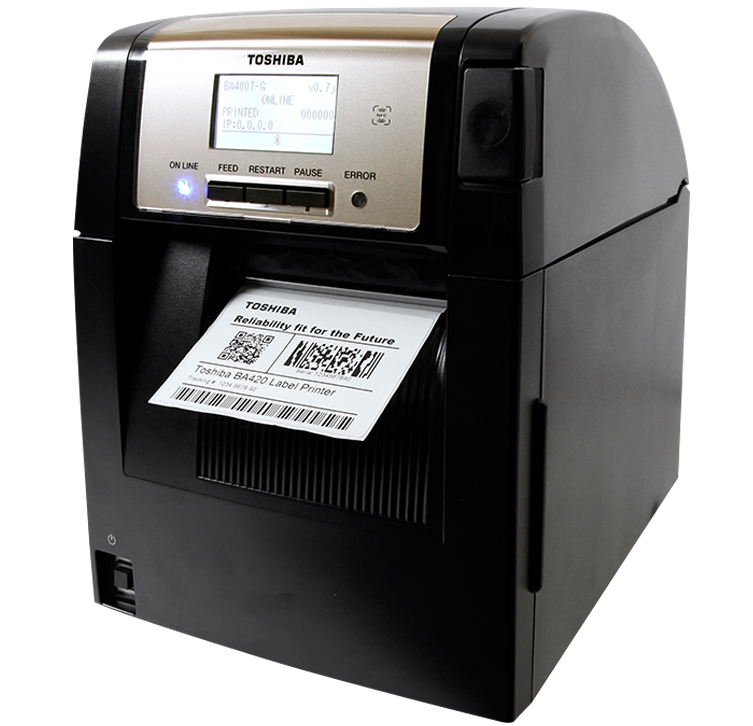
BA420TGS12QMSM01P Toshiba 4″ Thermal Transfer Printer
BA420
- 4″ Thermal Transfer (Plastic Case)
- Resolution: 203 DPI
- Speed: 8 IPS
- Full Value Mid Range Printer
- Space Saving Top Loading
- Available in U.S. and Latin America
BA420 SPECIFICATIONS
Technology – Thermal Transfer / Direct Thermal
Resolution – 203 dpi
Media Width – 0.87″–4.13″ (22–105 mm) – Thermal Transfer 0.98″–4.65″ (25–118 mm) – Direct Thermal
Print Speed – Up to 8 ips
Interfaces (Standard) – USB 2.0 HS, Bluetooth V2.1 EDR with Mfi Certified, Ethernet (IPv4&IPv6), Peel Module
Barcodes – JAN8, JAN13, EAN8, EAN8+2 digits, EAN8+5 digits, EAN13, EAN13+2 digits, EAN13+5 digits, UPC-E, UPC-E+2 digits, UPC-E+5 digits, UPC-A, UPC-A+2 digits, UPC-A+5 digits, MSI, ITF, NW-7, CODE39, CODE93, CODE128, EAN128, Industrial 2 to 5, Customer Bar Code, POSTNET, KIX CODE, RM4SCC (ROYAL MAIL 4STATE CUSTOMER CODE), GS1 DataBar, MATRIX 2 of 5 for NEC
2D Codes – Data Matrix, PDF 417, Maxicode, QR Code, Micro PDR 417, CP Code, Aztec, GS1 Data Matrix
Fonts – Bitmap, Outline, Writable Characters, Optional TrueType, OTF
Dimensions – (W x D x H)9.4″ x 13.1″ x 13.7″
Weight – 26.5 lbs.
Using this Toshiba 4″ Thermal Transfer Printer is easy. Just load your media within the specified width range (0.87″–4.13″ for thermal transfer and 0.98″–4.65″ for direct thermal) into the top loading tray. Connect it via USB 2.0 HS, Bluetooth V2.1 EDR with Mfi Certified, or Ethernet (IPv4&IPv6). Select the type of barcode or 2D code you want to print from the wide range it supports. Set the print speed to 8 ips as per your requirement. For fonts, choose from the available options like bitmap, outline, etc. Make sure to keep the printer clean regularly to maintain its performance. Avoid overloading the printer with media that exceeds the specified width limits. Also, update the printer’s software from time to time to ensure it functions smoothly and has the latest features.
Be the first to review “BA420TGS12QMSM01P Toshiba 4″ Thermal Transfer Printer With Credit Card Cheap Pice”
Related products
Office Electronics
Office Electronics

Office Electronics

Office Electronics
Reviews
There are no reviews yet.